Free and open source

Estanza Card for Home Assistant

Your home in 3D on your dashboard, lit by your own entities. The card is free, carries no watermark, and has no tracking code in it.

Free, and it stays freeNo watermark, on any planOpen source, MIT licence
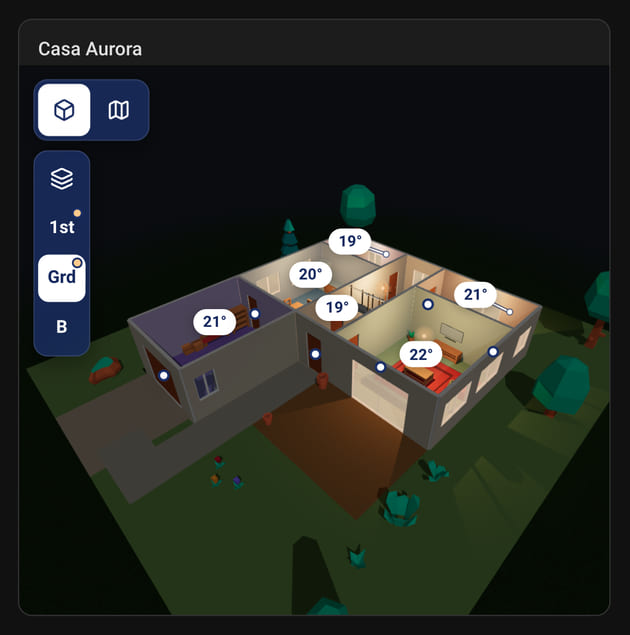
A Home Assistant card with Casa Aurora in 3D at night, a few rooms lit and each room's temperature.
What it does

Your entities, drawn on your own home

Lights in their real colour

A lamp that reports a colour is drawn in it, and brightness dims the light instead of switching it off, so a lamp at ten percent reads as one. A lamp that reports only a colour temperature is matched to the nearest warm, neutral or cool white. In 3D the scene follows the real sun on its own, so the house turns to night when it does outside.
Doors that swing open

Bind a door to its contact sensor and the door in the model swings open with it. A window does the same, both sashes at once. A cover that reports a position opens part of the way.

Rooms that know their temperature

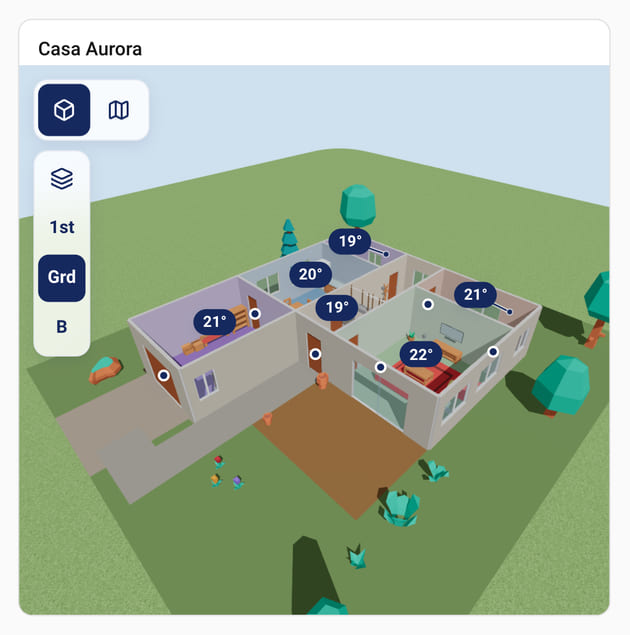
Bind a room to a Home Assistant area and every light in that area drives the room, while its temperature and humidity sensors are found on their own. The reading stands on the room itself, in 3D and on the floor plan. Name a specific thermometer when the automatic choice is wrong.

What this version does not do

It never acts on its own. A tap switches a light or opens and closes a cover, and a lock only moves after a second tap to confirm, all through your own Home Assistant login and never through us. A door or window bound only to a sensor shows its state and cannot be opened from here, because a sensor reports and does not act.

Linking

Point at a thing, pick its entity

The visual editor walks the whole thing. You never have to write YAML, and there is no list of entity ids to look up first.

01

Paste your share link

Paste your home's share link, the same one that opens it on the web, into the first field; the id on its own works too. Or load a home file you exported, and the card never has to ask Estanza for it.

02

Pick a thing, then its entity

The editor draws your home as a plan, with every light, door and window marked. Tap a room or a thing and a picker opens, listing only the entities that fit it, best match first, each with its area and live state. One tap links it.

03

For a room, pick the area

A room's picker also offers its Home Assistant area, and that is the easy path: every light in the area drives the room and its climate sensors are found for you. Whatever is not linked yet waits under the plan with its best match as a one-tap suggestion, and one press takes them all.

If a home cannot be loaded, the editor says so, offers to try again and points you to the home file, so a home you have not published yet is not a dead end. The YAML is written for you either way, and you can edit it directly if you prefer.

Install

Three steps in HACS

The card is not in the HACS default store yet, so you add it as a custom repository: one click with the button below, or one paste by hand. It updates through HACS the same way afterwards. Getting into the default store is a queue that runs for months, and we are not going to promise you a date.

Open in HACS

The button opens the card in your own HACS. Confirm your Home Assistant address, press Download, refresh the browser and go on to step 3. Or follow the steps by hand.

01

Add the repository

In Home Assistant open HACS, then the three-dot menu, then Custom repositories. Paste https://github.com/estanza-casa/estanza-card, choose the Dashboard type (older versions of HACS call it Lovelace) and press Add.

02

Download the card

Search HACS for Estanza and download it. HACS registers the dashboard resource for you. Then hard-refresh the browser: Home Assistant caches resources hard, and a stale cache looks exactly like a broken card.

03

Add it to a dashboard

Edit any dashboard, press Add card and pick Estanza. It opens on the visual editor, asking for your share link.

The promise

Free, with no telemetry

The card is the free part of Estanza and it stays that way. Everything it does is free for everybody: the rendering, the bindings, tap to control, all of it. There is no paid tier inside the card and there never will be, because the card is how people find us in the first place.

  • Free, and it stays free
  • No watermark on the scene, on any plan
  • No tracking code, no telemetry, no login
  • Open source under the MIT licence
A Home Assistant card with Casa Aurora in 3D by day and each room's temperature.
What the card sends us, exactly

The card only contacts Estanza to fetch your home from your share link. No telemetry. Your entity ids, their states and your Home Assistant token stay in your browser and are never sent anywhere. With a share link, the card fetches your home's geometry from Estanza and asks again every five minutes and whenever the page comes back into view, never while it is hidden, so a republished home arrives on its own. Each request carries the card's version, so we can tell you when an update is due, and we count card loads without knowing who you are: one count per home per day, with the country it came from. Your IP address is never stored, no entity, area, temperature or brightness is ever sent, and there is no tracking code anywhere in the repository. Load a home file instead and the card never asks for your home; point it at your own copy of the furniture models too and it never touches the public internet at all.

Questions

The ones people ask

Why is it not in the HACS default store?

Because that queue runs for months and we would rather ship. A custom repository install works today and behaves the same afterwards, updates included.

Do I need an Estanza account?

You need a home, and building one is free. The card itself never asks you to log in: it reads a share link, which is a public address for the shape of your home and nothing else.

Does it work without internet?

Once the dashboard is open, yes: every light, door and temperature comes from your own Home Assistant, in your browser, with no round trip to us. With a share link, loading the dashboard fetches the geometry from Estanza, so a cold start needs the connection. Load your home file into the card instead and the home needs no connection at all; only the furniture models are fetched, and they can come from your own copy.

Is this an official Home Assistant project?

No. Estanza is not affiliated with the Open Home Foundation and this card is not endorsed by it. It is a community card, like any other you install from HACS.

Build the home first

The card needs a home to draw. Making one is free, it runs in your browser, and an evening is enough.

Build your home free